How I Run 5 Claude Code Agents in Parallel on Windows
On a normal working day I have three to five Claude Code sessions running at the same time: one refactoring a backend, one writing tests, one doing research, one handling a release, and one that I'm actively talking to. This post is the honest version of how that works on Windows, what broke when I tried to do it with plain terminal tabs, and the setup I ended up building for myself.
Short answer up front: run each agent in its own workspace that opens in the right folder, isolate same-repo parallel work in git worktrees, make every agent end its report in a format you can skim in ten seconds, and get a notification the moment any session finishes. That combination turns "babysitting five terminals" into "reviewing five results".
Why would anyone run five Claude Code agents at once?
Because one agent leaves you idle. Claude Code does the typing, but a single session means you prompt, then wait, then review, then prompt again. The waiting is where your day disappears.
The moment I split work across parallel sessions, the rhythm changed: while agent A refactors, agent B writes the regression tests for yesterday's fix, agent C researches a library decision, and I review whichever one finishes first. I'm not coding faster. I'm waiting less.
There's a ceiling, but it moved. It used to be "how much code can I read?", and at five sessions that answer was: not enough. Then I noticed that reading every line is the wrong goal anyway. Code got cheap; an agent reads a diff faster and more patiently than I do. What I actually need from each stream is different: proof that it works (tests that honestly fail without the change), proof that it integrates without regressions, and enough architectural understanding that the system stays mine. Verification and ownership are the bottleneck now, not reading speed, and the whole setup below is organized around that.
What breaks when you do this in Windows Terminal?
I tried running parallel agents in plain Windows Terminal tabs first. To be fair to it: you can rename tabs there, and you can split panes. The problems start a bit deeper:
- Nobody maintains manual naming at five sessions. Renaming is possible, but it's on you, every session, every day. In practice the defaults win, and you're clicking through identical tabs looking for "the one doing the auth refactor".
- Splits are fixed. You can split a pane, but you can't freely rearrange the layout after the fact, or move a running session into another window or group. Whatever you split first is the layout you live with.
- You can't tell who's done. An agent that finished twenty minutes ago looks exactly like one that's mid-task. I was alt-tabbing on a timer like a human polling loop.
- Every morning is setup again. Close the window and tomorrow you're cd-ing into five directories, restarting five sessions, re-explaining context to each one.
How do I keep five sessions organized?
Honestly, this part is small stuff; it just has to happen automatically instead of by hand:
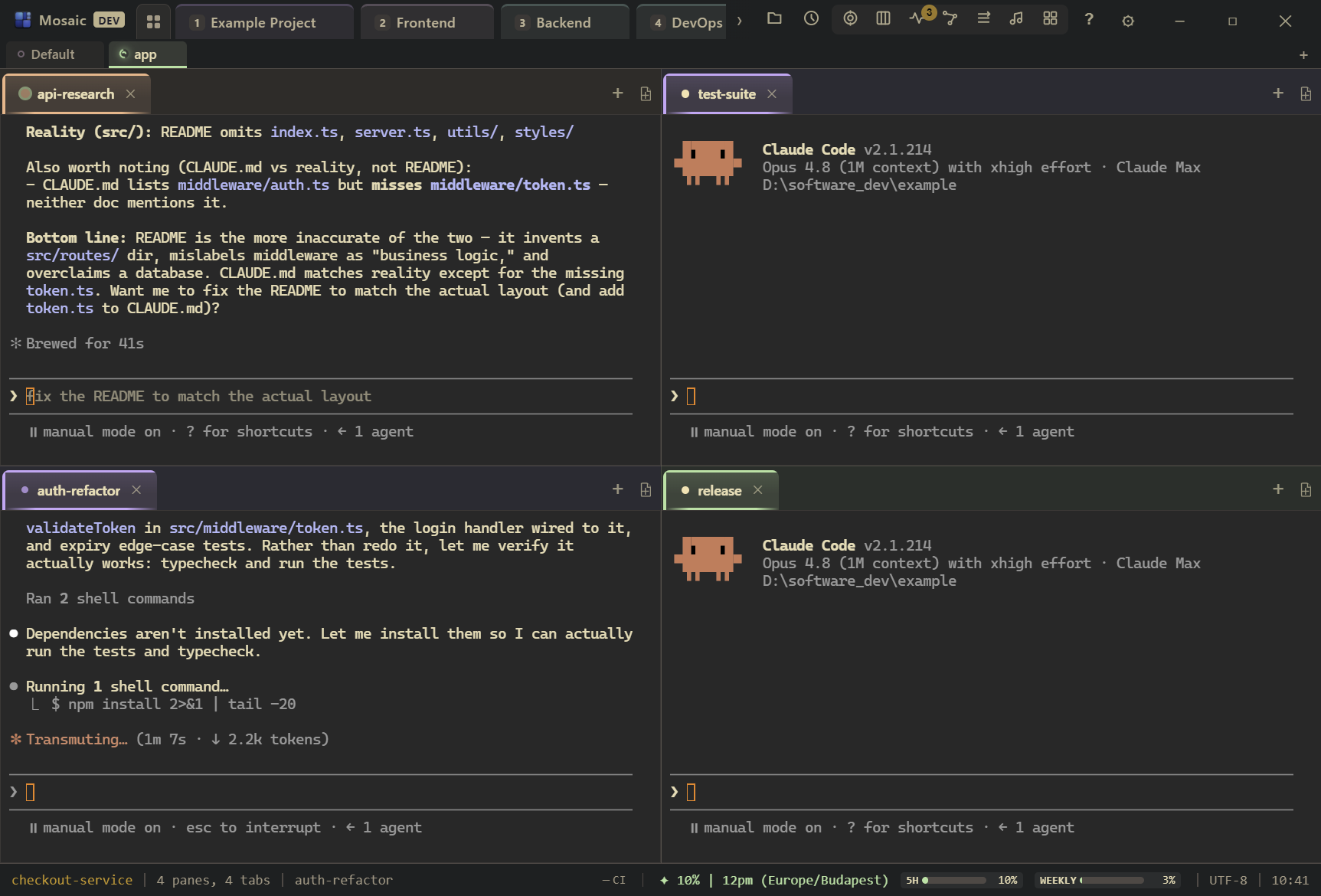
- A workspace per project, contexts inside it. Every workspace opens terminals in its project's folder, so a new session starts in the right place with zero cd-ing. Contexts split a workspace further (app / backend / experiments), which is also what saves the context-switch cost when I do move: I land in a small, relevant group, not in everything I have open.
- Tabs name themselves. Mosaic exposes MCP tools to the session, so a
/renameinside Claude Code sets the pane title to the task, and new sessions get auto-named from their first prompt anyway. The tab bar ends up describing my day without me maintaining it. - Everything rearranges. Tabs reorder by drag; a session moves between groups, contexts, even workspaces with the terminal staying alive through the move. When a "quick fix" turns out to be a real piece of work, I promote it to its own context and carry on. No restart, no lost scrollback, no re-briefing.
How do I stop parallel agents from conflicting in git?
Different projects, different repos: nothing to solve. This covers most of my parallel load.
Same repo, multiple agents: git worktrees, one per agent, each on its own branch. The agents can't overwrite each other mid-edit, and I merge branches after review. You can simply instruct an agent to create its own worktree with git worktree add and work there, and it will.
What I don't do is let two agents free-edit the same branch at the same time. I tried. The merge archaeology isn't worth it.
What do I do while they work?
This turned out to be the real skill, and it has a name in the research now: cognitive debt. When code ships faster than the team builds a mental model of it, understanding erodes; Thoughtworks' Tech Radar flags it as a risk of exactly this kind of workflow, and studies of AI-assisted work keep finding the same shape: more output, weaker comprehension and ownership. Field studies of developers who get good results with agents find they don't passively wait either; they control, verify, and plan around the agent's work.
So the time while agents run isn't free time; it's where I pay down the debt on purpose:
- Review the last finished task, not the running one. Watching a working agent is theater. Reviewing a finished one is work.
- Write the next brief properly. A sharp task description with constraints and a definition of done saves more time than any amount of mid-flight supervision.
- Read the explanation, not just the diff. For larger work I have agents produce a closing artifact: what changed, why, with figures where it helps, written as learning material. Not just a markdown file, either; I have them write it as an HTML page that lands in an indexed dashboard, so the explanations pile up into something I can browse and come back to. Reading those is how I keep architectural ownership of code I didn't type.
- Guard the verification gates. Agents will happily make a test pass instead of asking whether the test is right. Test changes and "I fixed the flaky test" claims get my eyes, always.
One more experiment worth mentioning: some days I promote one session to overseer and let it manage the workers, briefing them, checking on them, nudging the stuck ones over agent-to-agent messaging. Claude Code can do a version of this natively by spawning its own subagents, which has gotten genuinely good; running the orchestrator as a visible session of its own is the variant I've been testing, and the results have been promising. It's not my daily driver yet, so I'll write it up separately once it has earned it.
What does a working block actually look like?
Not a heroic morning routine, just a repeating loop:
- Open the app. Yesterday's sessions are alive, in their workspaces, with their scrollback. Nothing to restart, nothing to re-explain.
- Brief the day's parallel batch. Every agent's instructions include a standing rule: end each report with a short ELI5 summary, a senior-level summary, and a "next step" line. That format is the difference between reviewing from anywhere in ten seconds and re-reading a wall of terminal output.
- Work on my own thing, or on the list from the previous section. When a completion ping lands, I finish the thought, then read the agent's closing summary first, artifact second, diff last.
- When a feature is fully ready, I go through the changes in a git viewer (Fork, in my case), check that the proof holds, and merge. I wrote up how the pings and the unread queue work in how I know the second an agent finishes.
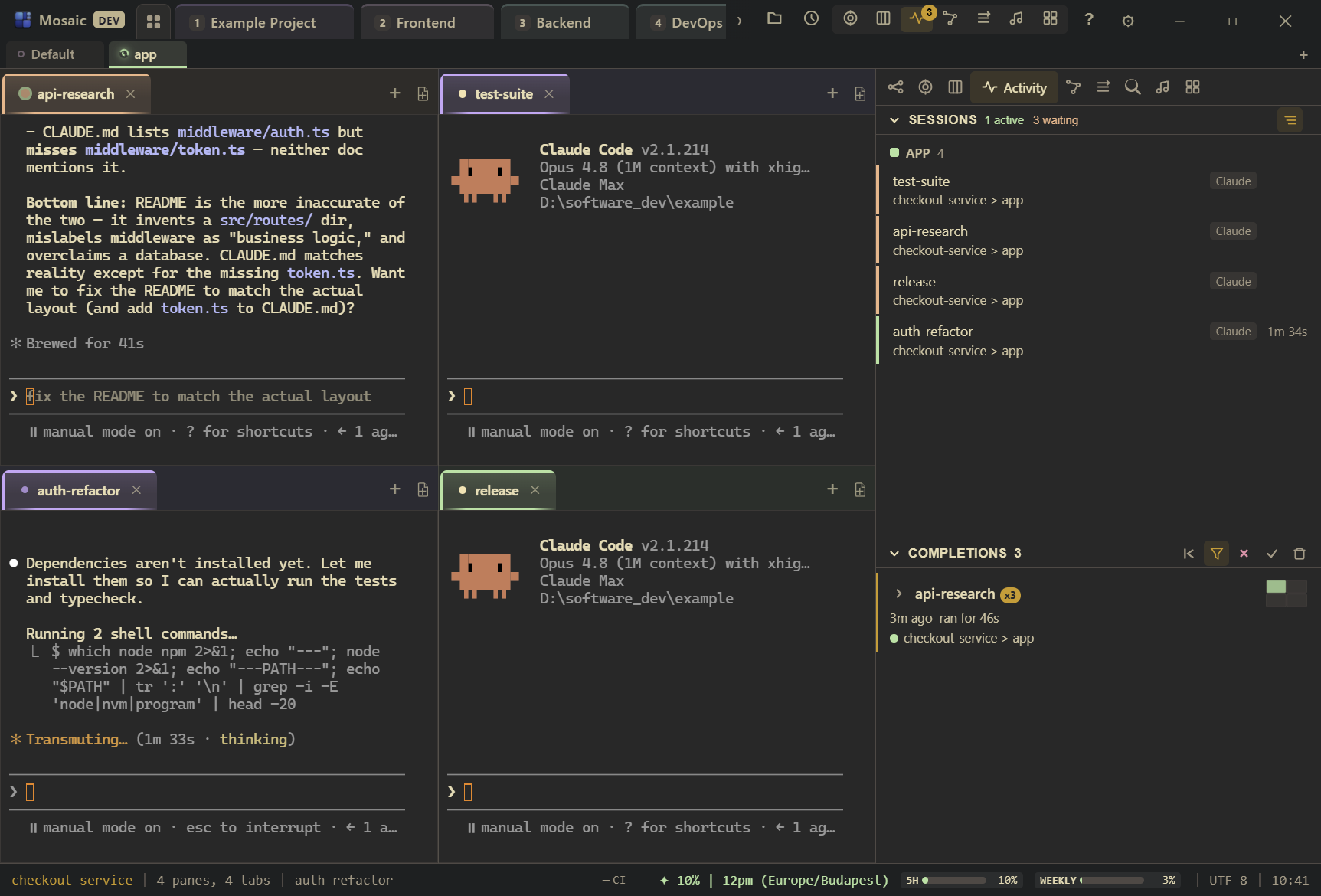
The point is what I don't have to do anymore: cd into five directories, hunt for tabs, ask "is it done yet", rebuild the whole setup every morning, or let unreviewed diffs pile up and call it progress.
Do I need special tooling for this?
You can do all of this by hand: name your tabs, keep one repo per agent, run git worktree yourself, put a report format in your CLAUDE.md, and check on sessions on a schedule.
I did that for a while, and then I built Mosaic Terminal so it happens without me thinking about it. What I actually notice day to day: my mornings start where yesterday ended instead of with setup; the tab bar reads like a plan instead of five identical prompts; finishing finds me instead of me polling; and moving work around never costs me a running session. Those are the outcomes; the features behind them (workspaces, MCP-named tabs, completion pings, live session moves) are just how they're delivered. It's a one-time purchase, $79 for Standard.
If you'd rather build the habits manually, everything above still works. The workflow is the point; the tool makes it the path of least resistance.