How I Know the Moment Claude Code Finishes (Without Babysitting It)
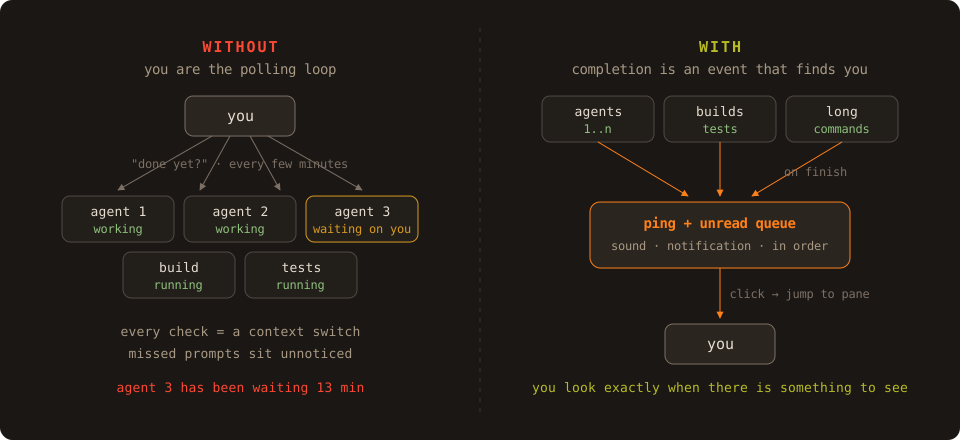
The quiet truth about running AI coding agents is that a lot of the "supervision" is just polling. You give Claude Code a task, switch to something else, and then some anxious background process in your head makes you alt-tab back every few minutes to check whether it's done, stuck, or waiting for a permission prompt. The agent works autonomously. You don't.
The fix, short version: make agent completion an event that comes to you (a sound plus a notification with a one-click jump to the session), and keep an activity feed with unread completions so anything you missed while heads-down or away is waiting for you as an ordered list, not a tab hunt.
Why is checking on agents so expensive?
Because the cost isn't the ten seconds of looking. It's the context switch.
Every "let me just check the agent" pulls you out of whatever you were doing, and research on interrupted work consistently finds that getting back into a task takes far longer than the interruption itself. Multiply that by three or four running sessions and by a check every few minutes, and parallel agents quietly turn into a full-time supervision job.
I was running more agents to save time and spending the saved time watching them.
To be clear, some watching is legitimate work: when an agent finishes, I read the output, think it through, and often watch what it does with my corrections. That's review, and it should happen. The waste is the other kind of checking, polling a running session just to learn "still going". That information is binary, cheap, and machine-detectable; there's no reason a human should be the polling loop.
Grouping helps too: I keep related sessions together in one workspace (each project gets its own, with contexts for sub-areas), so when I do switch, I land in the right neighborhood instead of scanning everything I have open.
What did I try before this setup?
Claude Code's own notification options, honestly. There's a hook system that can fire a command when a session finishes or needs attention, and a terminal-bell setting, so you can absolutely wire up a "done" signal without any extra tooling.
It helped, and it's the right first step. Where it stopped being enough for me:
- It's per-session. Each Claude Code instance notifies about itself. With several sessions running, I still had no single place answering "what finished while I was gone, in what order?"
- No unread history. A notification you miss is gone. Come back from lunch and you're back to opening tabs one by one to reconstruct what happened.
- It only covers Claude Code. Builds, test runs, deploys, and other agents finish too, and they were invisible to it.
What I actually needed was one place that shows all of it at once.
What does my setup do instead?
Two things, and they cover each other.
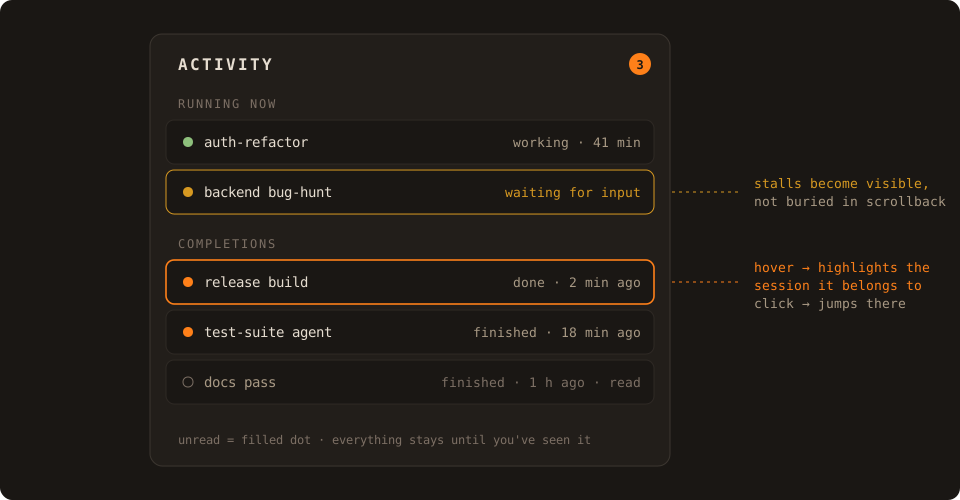
Completion events. When a long-running command or agent session finishes, I get an OS notification and a sound, with a small preview of what the session looks like. Hovering the notification highlights the outline of the exact session it belongs to, so I see where my attention is being asked for before I commit to going there, and one click jumps me to that pane.
The sounds are fully customizable (including your own audio file, per-workspace if you want different projects to sound different), which matters more than it seems: after a few days you know by ear which kind of work just finished, without looking at all.
The activity feed. This is the part I actually live in. Every completion lands in an activity panel as a notification with read/unread state, in order, with its workspace and context attached. It also shows what's running right now and since when.
Coming back to my desk starts with scanning one list: three unread completions, one agent still working for 40 minutes, and I decide what to open first. No tab archaeology.
What changed in practice?
Honestly: I still glance at the terminals now and then, old habits and healthy curiosity don't disappear. What's gone is the anxious version of it. I don't check in order to find out whether something finished, because finishing is an event that reaches me.
Waits and completions surface on their own, the unread queue catches everything from the stretches when I'm heads-down, and the permission-prompt stalls shrank from the other direction too, once I tightened my Claude Code permission setup so routine operations don't prompt at all; I wrote that up in how I set up Claude Code permissions.
This is the single piece of my setup I'd refuse to give up first, and it's a big part of why running five agents in parallel is calm instead of chaotic.
Can you build this without special tooling?
A good chunk of it, yes, and nowadays you can have Claude build it for you:
- Append a notifier to long commands (
; ntfy publish doneor acurlto a webhook) so builds and test runs announce themselves. - Wire a Claude Code hook to a desktop notification and you have a real per-session completion ping.
I'd genuinely encourage that; it's an afternoon of vibe-scripting. What I wanted beyond it, and the reason this layer is built into Mosaic Terminal, is the overview part: one unread completion queue across every session and command, ordered and filterable, showing who's working and since when, grouped by workspace, with click-to-jump and per-workspace sounds.
Not because it's impossible to script, but because I want it to be the default surface I look at, not another side project to maintain. It's a one-time purchase ($79 Standard, $149 Pro); the cross-session oversight layer is the Pro side.
FAQ
Does Claude Code have built-in notifications when it finishes? Yes, via its hook system: you can run any command when a session finishes or needs attention, including firing a desktop notification, and there's a terminal-bell option. What it doesn't give you is the cross-session layer: an unread history of what finished while you were away, and one view of everything running right now.
Does this work for agents other than Claude Code? Command-level completion pings work for anything that runs in a shell, builds and tests included. Claude Code is what I run daily, so that's where my setup is battle-tested; other CLI agents run in the same panes and get the same command-level treatment.